Adam June 14th, 2010
Note: This is a cross-post of documentation I am writing about Lazy Sessions.
Why use reverse-proxy caching?
For most public-facing web applications, the significant majority of their traffic is anonymous, non-authenticated users. Even with a variety of internal data-cache mechanisms and other good optimizations, a large amount of code execution goes into executing a PHP application to generate a page even if the content of this page will be the same for many users. Code and query optimization are very important to improving the experience for all users of a web application, but even the most basic “Hello World” script will top out at about 3k requests/second due to the overhead of Apache and PHP — many real applications top out at less than 200 requests/second. Varnish, a light-weight proxy-server that can run on the same host as the webserver, can cache pages in memory and can serve them at rates of more than 10k requests/second with thousands of concurrent connections.
While the point of web-applications is to have content be dynamic and easily changeable, for most applications and most of the anonymous users, receiving content that is slightly stale (cached for 5 minutes or something similar) isn’t a big deal. Sure, visitors to your blog might not see the latest post for a few minutes, but they will get their response in 4 milliseconds rather than 2 seconds.
Should your site get posted on Slashdot, a caching reverse-proxy server will give anonymous visitor #2 and up the same page from cache (until expiration), while authenticated users continue to have their requests passed through to the Apache/PHP back-end. Everyone wins.
Continue Reading »
Adam March 8th, 2010
For the past 6 months our Web Application Development work-group has been Bugzilla as our issue tracker with quite a bit of success. While it has its warts, Bugzilla seems like a pretty decent issue-tracking system and is flexible enough to fit into a variety of different work-flows. One very important feature of Bugzilla is support for LDAP authentication. This enables any Middlebury College user to log in and report a bug using their standard campus credentials.
While LDAP authentication works great, there is one problem: If a person has never logged into our Bugzilla, we can’t add them to the CC list of an issue. This is important for us because issues usually don’t get submitted directly to the bug tracker, but rather come in via calls, emails, tweets, and face-to-face meetings. We are then left to submit issues to Bugzilla ourselves to keep track of our to-do items. Ideally we’d add the original reporter to the bug’s CC list so that they will automatically be notified as we make progress on the issue, but their Bugzilla account must exist before we can add them to the bug.
Searching about the internet I wasn’t able to find anything about how to import LDAP users (or any kind of users) into Bugzilla, though I was able to find some basic instructions on how to create a single user via Bugzilla’s Perl API. To improve on the lack of user-import support I’ve created an Perl script that creates users from lines in a tab-delimited text file (create_users.pl) as well as a companion PHP script that will export an appropriately-formatted list of users from an Active Directory (LDAP) server (export_users.php).
Continue Reading »
Adam September 9th, 2009
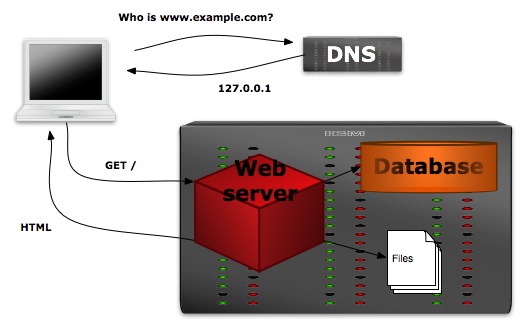
One of the requirements in the migration of our web sites to Drupal is that we create a robust and redundant platform that can stay running or degrade gracefully when hardware or software problems inevitably arise. While our sites get heavy use from our communities and the public, our traffic numbers are no where near those of a top-1000 site and could comfortably run off of one machine that ran both the database and web-server.

Single Machine Configuration
This simple configuration however has the major weakness that any hiccups in the hardware or software of the machine will likely take the site offline until the issues can be addressed. In order to give our site a better chance at staying up as failures occur, we separate some of the functional pieces of the site onto discrete machines and then ensure that each function is redundant or fail-safe. This post and the next will detail a few of the techniques we have used to build a robust site.
Continue Reading »
Adam June 19th, 2009
Central Authentication Service (CAS) is a single-sign-on system for web applications written in Java that we have begun to deploy here at Middlebury College. Web applications communicate with it by forwarding users to the central login page and then checking the responces via a web-service protocol.
A few months ago Ian and I got CAS installed on campus and began updating applications to work with it rather than maintaining their own internal connections to the Active Directory server. Throughout this process we ran into a few challenges (such as returning attributes with the authentication-success response) and a bug in CAS, but we worked through these and got CAS up and running successfully.
We are now at a point where we need to do some customizations to our CAS installation to deal with changes to the group structure in the Active Directory. As well, the bug I reported was apparently fixed in a new CAS version, an improvement I need to test before we update our production installation. Both of these require a bit more poking at CAS than we can do safely in our production environment, so I am now embarking on the process of setting up a Java/Tomcat development environment on my PC. I’m documenting this process here both for my own benefit (when I have to set this up again on my laptop) and in case it helps anyone else.
Read on for my step-by-step instructions for setting up a CAS development environment on OS X.
Continue Reading »
Adam January 13th, 2009
One of the great things about the Git version-control system is the ability to incrementally commit your changes on a private branch to keep a step-by-step record of your thought and writing process on a fix or a feature, and then merge the completed work onto your main [or public] branch after your feature or fix is all done and tested. By keeping an incremental log of your changes — rather than just committing one giant set of code with changes to 30 files — it becomes much easier to know why a certain line was changed in the future when bugs are discovered with it.
One thing that often happens to me though, is that I work for about a half hour to an hour trying to get a new piece of code working and in the process make several sets of changes to one file that are only loosely related.
Let’s say that I am fixing a bug in my ‘MediaLibrary’ class and while doing so notice some some spelling mistakes in some comments that I fix. Now my one file has two changes my bug fix, and the spelling fix. Rather than committing both changes together with one comment describing both changes, I can highlight one of the changes in git-gui and select the “Stage Hunk for Commit” option.

With that one hunk staged I can now commit with a message applicable to that change. Other changes can then be staged and committed with their own messages resulting in a very understandable history of changes.
“Stage Hunk for Commit” can also be used to commit important changes while not including debugging lines inserted in your code.
Adam June 25th, 2008
This post describes an interoperability demonstration given at OpeniWorld Europe 2008 in Lyon, France.
Abstract
Segue and Concerto are two curricular applications built upon Harmoni, an Open Service Interface Definition-based (OSID) service-oriented application framework. This demonstration will show how website content created in Segue is stored as OSID Assets in Harmoni’s OSID Repository. Similarly, the demonstration will show how multimedia assets created in Concerto can be stored same repository. Interoperability will be demonstrated as each application is used to view and make real-time modifications to the OSID Assets created using the other application, while at the same time respecting the authorizations given to those assets. Additionally, an OSID Repository to OAI-PMH gateway will be shown providing the LibraryFind meta-search tool with access to the metadata for content created in Segue, Concerto, and a lightweight, read-only OSID Repository.
Software Demonstrated:
Adam June 9th, 2008
Another week, another Segue 2 beta. This week’s installation brings visitor registration, a few new themes from Alex, theme migration from Segue 1, and a bunch of little bug fixes.
Visitor registration brings with it a few interesting challenges. As in Segue 1, we want (and need) to be able to allow people outside of the Middlebury community to join in on public discussions hosted in Segue. As well, Middlebury users often need to give access to restricted parts of their sites to people off-campus with whom they are collaborating. Our visitor registration system therefore needs to be easy to use by registrants, keep out spammers, as well as enable searches for visitor accounts by community users.
To keep out spammers, the visitor registration form uses reCAPTCHA to try to verify that a human is sitting at the browser. There are other CAPTCHA systems out there, but I like the philosophy and approach of reCAPTCHA. Starting with words that OCR software had trouble reading seems like a good idea. After the registration form is filled out, Segue sends an email to the address entered with a unique registration code. Until the link in the email is clicked on (and hence the address verified) the account is locked.
To enable easy searching of visitor accounts, visitors are asked to enter their name. While there are a few restrictions on names, these are user-chooseble. To provide some measure of differentiation between verified institution accounts and visitor accounts visitor accounts have the user-chosen name followed by their email domain name in parenthesis, e.g.:
Adam Franco (gmail.com)
I weighed including the entire email address as that is the only verified information we have about the visitor accounts, but I’d rather not open that information up for harvesting by spammers. If abuse becomes an issue, the visitor registration system also supports both black-lists and white-lists of email domains.
Adam May 19th, 2008
We’ve recently announced our migration plans to the campus: We’ll be rolling out Segue 2 in mid-August for production use in the fall semester.
I’ve now been working on Segue 2 directly or indirectly for 5 years, since June 2003. It has been a long road and it is wonderful to finally be cresting the last rise. That said, as the feature-request tracker indicates, we still have a lot to do over the next 12 weeks.
Theming
This past week I rebuilt the theming system for the 4th (and last before production) time. The challenge with the theming system is that we wanted to enable end-users to choose from a few straight-forward options for things like ‘overall color scheme’, ‘font size’, corner-treatment — not all of which mapped cleanly to CSS properties. As well, to enable more powerful themes, we needed to let theme developers wrap each content type with HTML tags in order to get some effects that are just not possible with plain CSS when the dimensions of the element are not known. Our first three theming implementations involved different PHP classes for each theme with method for setting various options. Each implementation had its own strengths and weaknesses, but they were all hideously complex and required theme developers to know PHP in order to do more than change the CSS. The new theme implementation scraps all of that complexity and defines themes as a set of CSS files and HTML templates, with associated images. An extension to this simple base adds an option listing (defined in XML) that enables placeholders in the CSS and HTML templates to be replaced with values from end-user-choose-able options.
With the new theming system in place in development Alex has set to work building the first three (Rounded Corners, Shadow Box, and Tabs) of the themes that will be distributed with Segue while I’ve been finishing up the user-interfaces for choosing theme options and enabling more advanced users to customize the theme CSS and HTML in their web-browser. So far Alex and I are pretty happy with the new theming system and its simplicity should give it much longer legs than our previous attempts.
While it won’t make it to production, I eventually plan to have a theme-gallery that users can choose to publish their designs to for use by the rest of the community.
Up Next
With theming out of the way the following are some of the next areas I’ll be working on in addition to fixing bugs and working out smaller kinks:
- Templates – starting points for sites
- Enabling embedded videos from trusted sites (i.e. YouTube, Vimeo, etc)
- Visitor Registration
- Copy/Move tools for Classic Mode
- Display of RSS feeds
Still a lot to do, but with each addition Segue 2 gets much closer to being able to take over as the primary course website system.
Adam May 19th, 2008
I’ve been feeling the urge to record a few thoughts and ruminations related to Segue and our other development work in Curricular Technologies at Middlebury College. I already post official project news, write a lot of documentation, and keep a Twitter work-log of day to day details, but something seemed to be missing. Rather than set up yet another blog, I figured that I would just add some work-related things here. I don’t plan on making this a work-only blog, but my personal-life postings are few and far-between enough that a little more content shouldn’t hurt.
If you are only interested in my work-related posts, check my work category or subscibe to its feed. Enjoy!