
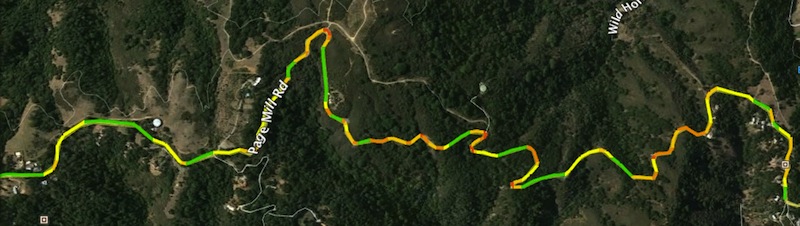
Update October, 2020: Curvature is now available as an in-browser map.
Update November, 2016: New dedicated Curvature site — roadcurvature.com
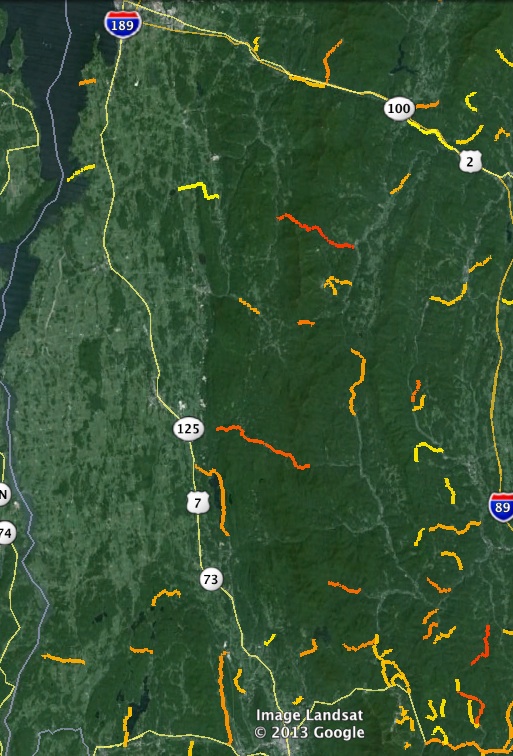
Update October, 2013: Google Earth KML files generated by curvature.py are now available covering the entire world.
In the process of taking up motorcycling this summer I also gained an additional hobby: scouring maps and travel guides to find the roads that would be most fun to ride. While I’ve had great times on dirt roads through farmland and wide open highways, there just isn’t anything that compares to the thrill of leaning through the corners on a winding road.
While I’ve had some good successes in locating roads by map (such as Tracy Road), one of the shortcomings of a map is the tight curves you can really lean into tend to be below the resolution for many maps. Atlases and electronic maps like Google Earth allow you to zoom in, but then there is the problem of finding the gems in the sea of data. What I realized I needed was a way to highlight just the most curvy roads so that I would know where to explore next.
For those less familiar with the intersection of cartography and software, the electronic mapping systems of the world (your Garmin/TomTom GPS, Google Earth, MapQuest, etc) have sequences of thousands of coordinates that linked together define the paths of roads across the surface of the earth.

While most of these systems use proprietary data sets, a service called Open Street Map (OSM) is a community driven project that anyone can add and edit — a Wikipedia for cartographic data. In some parts of the world the Open Street Map has better coverage than any commercial providers; in the US the original data was imported from the public domain USGS TIGER data set and has then been expanded and improved by the community. I’ve known this data was available for a long time, but it was only last week I realized that it would be possible to search through the coordinates that make up road-paths to analyze their geometry rather than just their position.
I can get the raw data from the Open Street Map for the path of every road, but how to determine which ones are the most twisty? At the beginning I tried a strategies such as calculating the ratio of distance traveled on a road versus the distance between the start and end points. Unfortunately all of these methods had situations that confused the algorithms (such as circular roads) or didn’t distinguish between fun curves and boring broad changes of direction that would only be exciting at far beyond the speed limit. What I eventually came up with is a process of calculating the radius of curvature at every segment of every road and then adding up the length of the most curvy segments to get a total distance spent turning. The twistier the road, the more time spent turning.
I’ll get back to more of the details in a bit, but I ended up writing a small program that reads through the Open Street Map data and spits out KML (Google Earth) files that highlight just the twisty roads. This program is called curvature.py and is available on Github here: https://github.com/adamfranco/curvature/wiki
When running curvature.py you can pass a variety of options that allow you to highlight the roads you are most interested in. For example if you live in the flat Midwest you can pass it a low curvature threshold to try to locate roads that have any curves. Give it a medium threshold and the output can help you find a more interesting route to work. Similarly if you want to find just the most absolutely crazy-curvy roads in a region give it a high threshold to filter out wheat from the chaff.
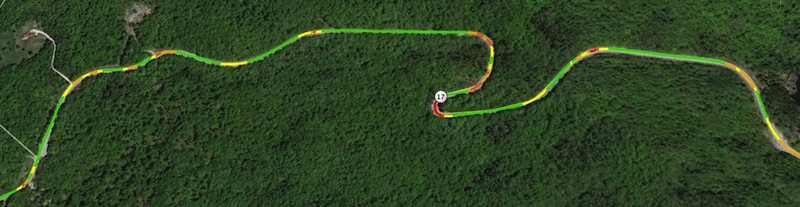
With the --colorize option, KML files will be generated with each road segment color-coded to match its curve-radius. Green segments are above the threshold considered “straight”, while yellow are broad curves, orange tighter, and red tightest:
More about calculating the curvature
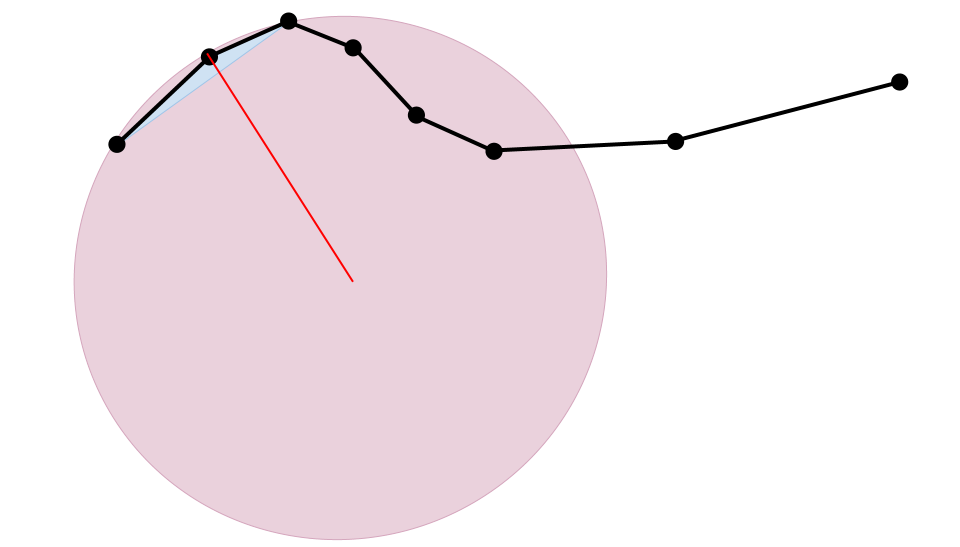
Each way (road) is made up of a sequence of points defined as a pair of latitude and longitude values. Each sequence of three points makes up a triangle where two of the sides are road segments with a hypotenuse between the 1st and 3rd points. Since we have the latitude and longitude of each point we can easily calculate the distances between them, but figuring out what the curvature of the road is at this set of points is a little tricky. Since the points aren’t evenly spaced the angle between the three points doesn’t tell us anything. Instead, we must go back to the geometric relationship that says for every triangle there is a circumcircle that intersects its three points. Using the equations for the circumcircle, we can plug in the distances between the three points and come up with the radius of that circle. That circle’s radius corresponds to the radius of the road’s curve at the middle of the three points.
Here is a video explaining the process:
Using Curvature
The Curvature Examples page shows a number of examples and provides links to KML files that you can open in Google Earth. If you’d like to just view curvature KML files that I’ve generated, you can find them at: http://www2.adamfranco.com/curvature/kml/



Hi Adam,
That is something I’ve been thinking of for the last year, but don’t have enough programming knowledge to do it. This looks perfect. Unfortunatelly I cannot use your solution as the imposm parser is not avaliable for Windows. Any suggestions on what to do in this case. Alternatively, maybe you could simply parse the Poland OSM, so that before the next motorcycle season I have a nice database of places to visit 🙂 ?Link to OSM is here: http://downloads.cloudmade.com/europe/eastern_europe/poland#downloads_breadcrumbs.
Cheers
Szymon
Hi Szymon,
I haven’t worked with Python on Windows, so I don’t have any installation recommendations. I’ve generated KML output for Poland though and have placed them here: http://www2.adamfranco.com/curvature/kml/europe/
Enjoy!
Adam
Adam
I have no idea how to run the Python script but I can sure open a .kml file. Could you do Austria and surrounding countries similar to what was done with Poland, and post that result? That would be fantastic! I live in Vienna Austria.
regards,
Joe
Hi Joe. It took me a while to figure out how to get parsing of PBF files working so that my computer could handle some of the larger European countries within its 8GB of RAM, but I’ve now generated KML files for all of Europe with the exception of France. The France input file is still too big to fit in memory, so I’ll have to figure out another way to split it up into manageable chunks.
By the way, if anyone is running this script themselves, curvature.py runs several times faster and with much less memory use if your input files use the Protocol Buffer Format (.osm.pbf) instead of the XML format (.osm).
Adam
SUPER! Thank you! May I request Alberta and British Columbia, Canada?
Adam,
Great work!
Also a motorcyclist and constantly looking for new twisty roads on maps and while leading rides while hunched over on Garmin Montana (“what was that cool looking side road leading off up a hill?”). It’s often that a slighly curvy up / down road will be just as fun as a more curvy flat road.
I typically overlay topo on US maps (possible on the Montana) while riding and look for curvy roads with elevation changes or interesting topo features (canyons, fall-lines, side-hills) in mind. They are also a huge help when planning for upcoming corners. Take Pepacton Reservoir in NY for instance. The elevation gains & losses on the north side add an extra component to already twisty roads.
Have you considered (is it even possible) to add in elevation / topo parameters?
Thanks
Marcus
Great idea! As another fellow rider I’ve spent hours looking at maps and trying to find good roads.
Again, great idea to start with. Just a thing I’ve noticed as I’ve been riding is that the maps can only tell you so much. A road that looks great on the maps can been boring or bad, a road that looks less interesting can be tons of fun. Things like the road surface, traffic, camber in turns, avg speed, and a lot of other things can affect fun, regardless of turns.
It’s a great resource but don’t depend on it for your riding choices. I recently did a 1000 mile round trip to a ‘destination road’. VA 16, the ‘back of the dragon’, hopping on US 129’s bandwagon I guess. On the map it looks like fun, in reality it’s super tight and gravel covered on half of it. I can think of 10 roads I took before and after that were way better and that I thought of as nothing more than “the way I’m going”.
I really like how it color codes for how tight the turn is. I used my GPS a lot on VA 16 to help me know what kind of turn was coming up. Something like that with your color coding… or even better, audio…would be sweet.
Hi there. Google Earth seems incapable of opening any of the Norway .kml files because they’re too large. Is there a way to up the prerequisites for generating a point in the .kml file and be left with a file small enough to open? Or is there perhaps another way for me to view the data outside of GMaps?
Peder, Google Maps is very limited in the size of KML files it can display, and only a few of the smallest curvature files can be opened this way. The Google Earth desktop application can open vastly larger files and can easily handle the 87 MB “france.c_300” file which is 9 times larger than the Norway file. Use the Google Earth desktop application and you shouldn’t have any trouble.
Really cook work , I have worked with TIGER data and kml files in the past
Here’s the link to the old project, just in case you are interested.
http://www4.ncsu.edu/~anijhaw/E6/
The code itself is really old and might not even work.
Because the files can be so big, is there a way to generate an output file of roads longer that 5 or 10 km etc to make it more manageable? I am trying to load your excellent results into another excellent product for the android called Locus Pro.Thanks for all the great work. Joe
Adam,
Would it be possible to do a test file to see if the results could be filtered down to the best of the best curvy roads (Austria)? Example roads at least 10km in length with curvature being a high number? Is there a way you could suggest to filter the results on my own and then write back to a kml file? I love these results but for the super curvy places the file sizes are just too big. Thank you for everything.
Joe
Adam,
Great work, been wondering how software knows winding roads !!
Been looking for something like this to route plan (motorcycle), we’ve been using Tomtoms winding roads as we go but want to sit at home and plan the route too, I’ve investigated the GB C 1000 kml file and looking at roads I know seemed to agree while with my experience, so that already is a help.
Just a few things, most of the other kml files give an error when you try to download eg:
Error 503 Service Unavailable
Service Unavailable
Guru Meditation:
XID: 1650963961
I was going to look at the .py programme too but got an error trying to download the parser too?
Alan, Wales the land of the winding roads !