Archive for the 'Computers and Technology' Category  

Tips, software, instructions, and thoughts on all things tech.

Ruby and Rails Thoughts

February 3rd, 2009

Filed under: Computers and Technology

Tags: , , ,

I’ve decided to learn a few new programming languages and web frameworks over the next year or so to broaden my experience and just to have fun. I figured that I’d start with Ruby and its Rails framework. Python (and its Django framework) are also at the top of my list, but I seem to run into Ruby programs more often and the Rails fanatics are loudest, so I’m starting there.

After about 5 evenings of documentation and tutorial reading intermixed with a bit of programming I’m about 1/3 of the way through my first real Rails application and am beginning to have a few thoughts on Ruby, Rails, and the process of learning new languages and frameworks:

Languages are Easy…
This might have something to do with how my brain works, but I find learning new programming languages quite easy and extremely interesting. Some of the things I find really neat about the Ruby language:

  • Full-on object-oriented — I really like the consistency
  • Blocks and Iterators — I fell in love with blocks in SmallTalk, they are a great concept and so much easier to use than named callback functions
  • Method names can end in equals such as name=(newName), parentheses are optional, and spaces seem to be allowed in method names that include ‘=’, so attribute-setting methods can look syntactically identical to variable assignment operators. Example: adam.name=('Adam') is equivalent to adam.name = ('Adam') and is equivalent to adam.name = 'Adam'. Sweet syntactical sugar.
  • All instance variables are private. Always. The snazzy setter/getter syntax can spoof the idea of public attributes while still retaining actual methods to do the work. (I never got the point of public attributes other than as a way to avoid other languages’ painful getter/setter syntactical requirements.)
  • Classes are never closed — can always add a method
  • Single-inheritance prevents ambiguity in the class-hierarchy, but there is this concept of ‘Mix-ins’ where the un-closed nature of classes (I think) allows for a class to obtain method implementations from another class without inheriting from it. It sounds interesting, but I haven’t played with it yet

The Ruby language may have some blemishes (and apparently a slow interpreter), but it seems like a pretty nice language in general and pretty devoid of major syntactical or conceptual warts.

…Frameworks are hard
While I feel like I can [mostly] get my head around Ruby in a few days, Rails is another matter. Rails follows a few architectural concepts very strictly: convention over configuration, DRY, MVC, etc. One of the problems (at least with the tutorials and documentation on the Rails website) is that few of the convention have descriptions on how they should be applied and the documentation is scattered and can be hard to follow. A lot of magic happens behind the scenes when things are named a certain way and it can be hard to sort out what’s up when something goes wrong.

One problem I ran into that took me forever to debug was that by naming one of my classes Connection and using it in a has_many relationship I collided with something internal to ActiveRecord which caused an indecipherable error when trying to save my object. Connection is not one of the reserved words listed for Rails.

It may just be that I need to find a good book for Rails, but the official online documentation seems to be rather sparse, disorganized, and/or scattered. I don’t mean to complain too much and I believe that Rails will become much easier to use after I have a bit more time in the saddle, but it is a complex system that is not easy to learn a bit at a time.

I don’t want to dwell on on comparisons, but I must note that I have been very spoiled by PHP’s excellent official documentation at PHP.net and for the Zend Framework. PHP has more warts than, well, something with a lot of warts, (it has many, many warts), and doesn’t begin to compare to Ruby in syntactical elegance, but good documentation is also a valuable thing.

With all this said, I now have only 5 evenings in Ruby on Rails and I plan to give it at least twice that more. I hope by the end of this first project I’ll be comfortable enough with it to use it on other small to medium-sized applications with relative speed and ease.

Git Tip of the Day: Stage Hunks

January 13th, 2009

Filed under: Computers and Technology , Work/Professional

Tags: , ,

One of the great things about the Git version-control system is the ability to incrementally commit your changes on a private branch to keep a step-by-step record of your thought and writing process on a fix or a feature, and then merge the completed work onto your main [or public] branch after your feature or fix is all done and tested. By keeping an incremental log of your changes — rather than just committing one giant set of code with changes to 30 files — it becomes much easier to know why a certain line was changed in the future when bugs are discovered with it.

One thing that often happens to me though, is that I work for about a half hour to an hour trying to get a new piece of code working and in the process make several sets of changes to one file that are only loosely related.

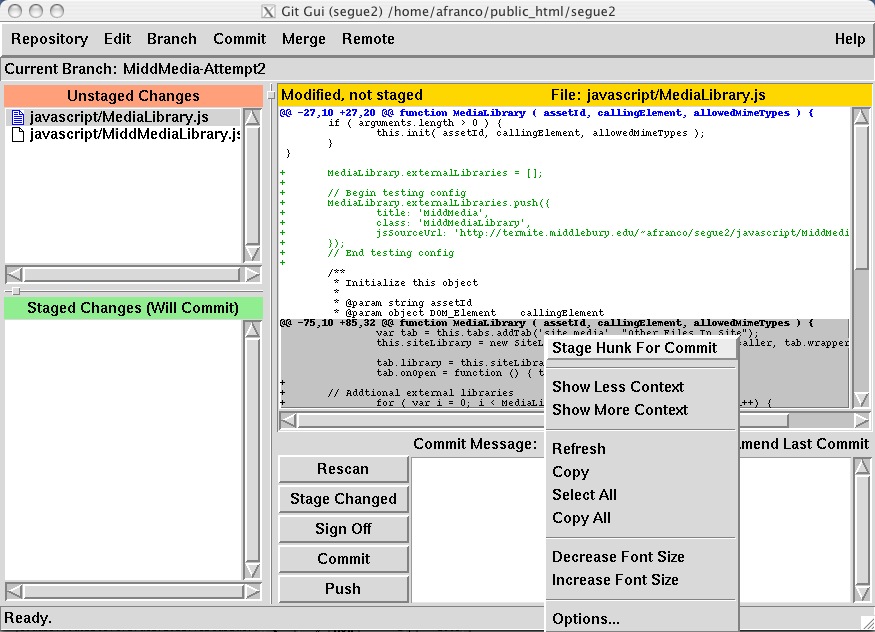
Let’s say that I am fixing a bug in my ‘MediaLibrary’ class and while doing so notice some some spelling mistakes in some comments that I fix. Now my one file has two changes my bug fix, and the spelling fix. Rather than committing both changes together with one comment describing both changes, I can highlight one of the changes in git-gui and select the “Stage Hunk for Commit” option.

Screen-shot of Staging a Hunk of code

With that one hunk staged I can now commit with a message applicable to that change. Other changes can then be staged and committed with their own messages resulting in a very understandable history of changes.

“Stage Hunk for Commit” can also be used to commit important changes while not including debugging lines inserted in your code.

Twitter Export Script

October 13th, 2008

Filed under: Computers and Technology , Software

Tags:

I have been using Twitter as a log of my daily doings and wished to export my time-line for reformatting into a calender format. Unfortunately TweetDumpr just retrieves the list of Tweets using a single fetch request which is limited by the Twitter API to a maximum of 200 Tweets. (Update: apparently TweetDumpr can get more than 200 Tweets. It just didn’t say so in its description.)

I wanted to export all 600+ of my tweets, so I wrote the following little php script to accomplish this. I have not yet tested it with many concurrent users or added a form to select which user to update. Until I do so, I won’t be providing it as an end-user service. You are free to put it on your own machine and use it though.

TwitterExport.php

<?php
/**
 * This script will allow the export of complete user time-lines from the twitter
 * service. It joins together all pages of status updates into one large XML block
 * that can then be reformatted/processed with other tools.
 *
 * @since 10/13/08
 *
 * @copyright Copyright © 2008, Adam Franco
 * @license http://www.gnu.org/copyleft/gpl.html GNU General Public License (GPL)
 */

$user = 'afranco_work';	// Replace this with your user name.

header('Content-type: text/plain');

$allDoc = new DOMDocument;
$root = $allDoc->appendChild($allDoc->createElement('statuses'));
$root->setAttribute('type', 'array');

$page = 1;
do {
	$numStatus = 0;

	$pageDoc = new DOMDocument;
	$res = @$pageDoc->load('http://twitter.com/statuses/user_timeline/'.$user.'.xml?page='.$page);
	if (!$res) {
		print "\n\n**** Error loading page $page ****";
		exit;
	}
	foreach ($pageDoc->getElementsByTagName('status') as $status) {
		$root->appendChild($allDoc->createTextNode("\n"));
		$root->appendChild($allDoc->importNode($status, true));
		$numStatus++;
	}

	print "\nLoaded page $page with $numStatus status updates.";
	flush();

	$page ++;
	sleep(1);

} while ($numStatus);

print "\nDone loading timeline.";
print "\n\n\n";

$root->appendChild($allDoc->createTextNode("\n"));
print $allDoc->saveXml();


Usage (assuming PHP is installed)

  1. Save the code above on your machine as twitter_export.php
  2. Edit the code to change the $user variable to be your own Twitter username
  3. From the command line run php twitter_export.php
  4. Copy/paste the XML output into a file for safe keeping and further processing

Getting Rid of the Translucent Menu Bar in Leopard

February 20th, 2008

Filed under: Computers and Technology

Tags:

With the latest OS X Leopard update (10.5.2) Apple finally added an option to turn off menu bar translucency. I much prefer an opaque menu bar as I find it much more legible. There is only one problem with this fix: Apple, in their infinite wisdom, decided to hide this option on computers that “don’t support transparency” due to having lower-end graphics hardware. After upgrading to 10.5.2 my MacBookPro laptop has the option to turn of menu bar transparency, but my newer and more powerful MacPro Desktop does not. After much searching and forum-reading I found that most of the people with this problem (menu bar is translucent, but the option to make it opaque is missing) had MacPro desktops with multiple monitors and video cards.

The problem it turns out, is that while one of my video cards (that drives my two primary monitors ) is a high-end ATI Radeon X1900XT that supports transparent menu bars, the second (that drives my two outer monitors used mostly for notes and email) is a cheaper NVIDIA GeForce 7300 GT. The presence of the lower-end card in the system was causing the “Translucent Menu Bar” option to be hidden, even though it was supported by my other card.

Steps to fix:

  1. Turn off computer
  2. Remove low-end video card
  3. Start computer
  4. Go to System Preferences –> Desktop & Screen Saver and un-check the “Translucent Menu Bar” option
  5. Turn off computer
  6. Replace low-end video card
  7. Start computer

It is a pain in the butt, but it works to get the damn translucency turned off.

River Levels Widget v1.2.1

February 10th, 2008

Filed under: Computers and Technology , Software

Tags: ,

A new version (1.2.2) is available that fixes issues with image URLs

This version is a re-release of version 1.2 which had a corrupted archive missing some necessary files.

RiverLevels 1.0 Screen Shot

The RiverLevels widget provides an easy way to monitor the amount of water flowing in your favorite streams and rivers right from your Dashboard. The RiverLevels widget is of particular interest to whitewater kayakers and canoeists.

Once any United States Geological Survey (USGS) stream-gauge station is selected, it is automatically refreshed to always provide you with the latest graph of the water-level. As of version 1.2 you can choose between two graph styles: discharge in cubic feet per second (CFS) and water-height in feet.

This widget is Free software, licensed under the GNU General Public License (GPL) version 3 or later.

Requirements:

  • OS X – 10.4 “Tiger” or later

Change Log:

1.2.1 (2008-02-10)

  • New zip archive includes the ‘library’ directory missing in the 1.2 release.

1.2 (2008-02-06)

  • Fixed Leopard (10.5) compatability bug.
  • Added the ability to choose Gauge Height (ft) in addition to discharge (CFS).

1.1 (2007-01-08)

  • Fixed graphs extending off bottom of widget
  • Fixed invisibility of front refresh icon

River Levels Widget v1.2

February 7th, 2008

Filed under: Computers and Technology , Software

Tags: ,

Update: A new version is available that fixes a corrupted archive in version 1.2.
RiverLevels 1.0 Screen Shot

The RiverLevels widget provides an easy way to monitor the amount of water flowing in your favorite streams and rivers right from your Dashboard. The RiverLevels widget is of particular interest to whitewater kayakers and canoeists.

Once any United States Geological Survey (USGS) stream-gauge station is selected, it is automatically refreshed to always provide you with the latest graph of the water-level. As of version 1.2 you can choose between two graph styles: discharge in cubic feet per second (CFS) and water-height in feet.

This widget is Free software, licensed under the GNU General Public License (GPL) version 3 or later.

Requirements:

  • OS X – 10.4 “Tiger” or later

Change Log:

1.2 (2008-02-06)

  • Fixed Leopard (10.5) compatability bug.
  • Added the ability to choose Gauge Height (ft) in addition to discharge (CFS).

1.1 (2007-01-08)

  • Fixed graphs extending off bottom of widget
  • Fixed invisibility of front refresh icon

Update: A new version is available that fixes a corrupted archive in version 1.2.

'Birthdays' calendar breaks sycing in OS X 10.5 (Leopard)

January 31st, 2008

Filed under: Computers and Technology

Tags:

After upgrading my laptop to Apple’s latest operating system, OS X 10.5 ‘Leopard’, I ran into a few issues here and there but for the most part I thought everything worked. After about a month using Leopard though, I noticed that my meetings were not syncing properly to my in-phone calendar. Several hours of frustration later my events are finally getting into my phone. The problem: the ‘Birthdays’ calendar generated from the Address Book application breaks the sync process. I’m glad that once I found the issue the fix was easy (disabling the Birthdays calendar), but holy dog-poo that was hard to find.

If you think you may have this error, open the Console application while running iSync. If you will see an error appear that contains the text

ISyncInvalidRecordException you referenced the following records (in a relationship) but did not actually push them

and then another message mentioning ‘birthdays’, disable the Birthdays calendar (iCal –> Preferences –> ‘Show Birthdays Calendar’) and try syncing again.

WordPress Enclosure Adder

September 6th, 2007

Filed under: Computers and Technology , Software

Tags: ,

I’ve recently developed a small PHP script, the WPEnclosureAdder (source | try) that goes through each item in an RSS feed, looks for links to YouTube videos or GoogleVideo videos, and then adds an enclosure tags for the videos. If multiple videos are found embedded in a post, then that post is duplicated in the feed for each additional URL to provide compatibility with the many RSS readers/video-podcast viewers that expect a single enclosure per post.

I wrote this script because I have been recently making heavy use of Miro (formerly known as “The Democracy Player“) to download videos from YouTube in order to watch them off-line. Miro also provides a nice UI for aggregating videos and remembers my spot when I go back to watching later (nice for long documentaries). Miro however, expects links to videos in RSS enclosure tags, something that WordPress (and probably other blogging software) doesn’t do for embeded videos.

Throw Away Your Telescreen is a video blog done by one of my favorite geo-political bloggers, Dave on Fire, and a few others. In it they link out to the most interesting “documentaries, lectures, and interviews that follow a different editorial line” from the corporate press. I highly recommend all of the videos on it that I have seen.

Throw Away Your Telescreen has all the makings of an indie-news channel, perfect for Miro which was developed to encourage participatory media and culture. The only thing missing was to get the videos embedded in Throw Away Your Telescreen’s posts in such a way that Miro can find them. With the WPEnclosureAdder, this has now been done. Use this feed to view Throw Away Your Telescreen in Miro.


More about the WPEnclosureAdder:

  • View the source-code of the latest version. (save-as to download)
  • License: GNU General Public License (GPL) version 3 or later
  • Requirements (for hosting it yourself): PHP version 5.2 or later
  • Git Repository: http://www2.adamfranco.com/WPEnclosureAdder.git

I wrote this script with Throw Away Your Telescreen in mind, but it should work with any other WordPress blog, and probably with RSS feeds generated from other blogging tools. To point it at another blog’s RSS feed, enter the feed url in the form below:

Using my version will use my default search strings for YouTube and GoogleVideo videos. If you would like to change what is being searched for, please download the script, change the configuration, and host it on your own website. I have licensed the WPEnclosureAdder under the GNU General Public License (GPL) version 3 or later, so you are free to copy and modify this script as per the terms of that license.

KML Joiner

August 29th, 2007

Filed under: Computers and Technology , Software

Tags: , , ,

As of a few days ago, I am now able to generate KML versions of Flickr photosets for viewing in Google Earth/Maps. With that taken care of, I also want to easily combine these KML documents of images together with other KML files that show additional information, such as paths traveled, points of interest, etc.

To accomplish this task, I have written a new script, the KML Joiner that will combine any KML documents on the web together into a single (referenced) KML document. (try it out)

More Detail: for those interested in KML
The resulting document is a collection of network links, each of which points to one of the KML URLs specified. Doing this rather than combining their text together into a static KML document prevents style collisions as well as allows changes in the source data to propagate to the combined document.

Refresh intervals can optionally be specified for every source document allowing for a server-friendly combination of static data with rapidly changing data. By default, no refresh interval is specified, making the linked documents load only once when first accessed.

Example:

View the KML Joiner with fields filled in that generates the map below.


View Larger Map

The map above is of the trip mentioned in a previous blog post, but this time the data sources (1. a static KML file with the path and house placemark, 2. a dynamic KML document generated with my Photo set to KML script) joined together with the KML Joiner script instead of manually put together with a text editor.

Usage:
You are welcome to use this script hosted on my site, or you can download it and run it on your own computer/webserver.

This script is available under the GNU General Public License (GPL) version 3 or later. (Source Code)

Please post any suggestions for fixes or changes. Thanks!

Flickr Photo Set to KML

August 23rd, 2007

Filed under: Computers and Technology , Software

Tags: , , ,

One of the things I (and others) have found lacking when working with geotagged images on Flickr, is the inability to retrieve a “photo set” (Flickr’s take on a slideshow) as a KML document that can then be displayed in GoogleEarth, GoogleMaps, or other geo-browsers. Flickr provides some KML links and GeoRSS feeds, but these are either limited to 20 items or can only be pointed at tags or users’ photo-streams, not a particular photo set.

To fill this niche, I present a small script I wrote to generate a KML file from the geotagged photos in a set:


Photo Set to KML     (try it out)


Features:

  • Generate a KML file from a Flickr photo set
  • Directly open the KML file in Google Maps
  • Choose what size image to include in the placemark description for each photo.
  • Optionaly draw a path (line) from photo to photo ordered in one of several ways: by date taken, by date uploaded, by set order. Useful for making a quick and dirty map of a trip.

Examples:

  • KML / GoogleMaps – Some photos from Cape Cod.

    View Larger Map
     
  • KML / GoogleMaps – A set of photos from a trip I took around Turkey, with lines drawn chronologically. Since this is a large set that causes GoogleMaps to time-out, I’ve downloaded the KML file and then re-uploaded it to my website. This is the method I recommend for large photo sets.

    View Larger Map
     

You are welcome to use this script hosted on my site, or you can download it and run it on your own computer/webserver. If you would like to run it yourself, please be aware of the following…

System Requirements:

This script is available under the GNU General Public License (GPL) version 3 or later. (Source Code)

Updates::

  • 2011-10-06
  • 2007-08-27
    • Now uses htmlspecialchars() to clean titles instead of htmlentities(), the latter of which was causing excessive translation of German characters. Thanks Stefan Geens, for pointing this out.
    • Form now generates valid XHTML 1.0 strict.
    • Now can use image thumbnails instead of camera icons. Thanks for the idea Nicolas Hoizey.
  • 2007-08-24
    • Now escapes ampersands in titles and descriptions. Thanks Jesse for pointing this out.

    Future Improvement Ideas::

    • Add an option for icon size.
    • Add options for custom icon/path styles. I’m not sure whether to give several options, or just provide a field for a block of arbitrary KML style-markup.

« Prev - Next »